Visualization
Draw sequences, annotations, alignments and sample distributions. PNG/JPG export requires viz dependencies; see FAQ: details。
1) Sequence text image
- Purpose: Draw DNA bases, coordinates and optional annotations into vector SVG, returning graphics that can be embedded in web pages or saved for quick viewing of short sequence content.
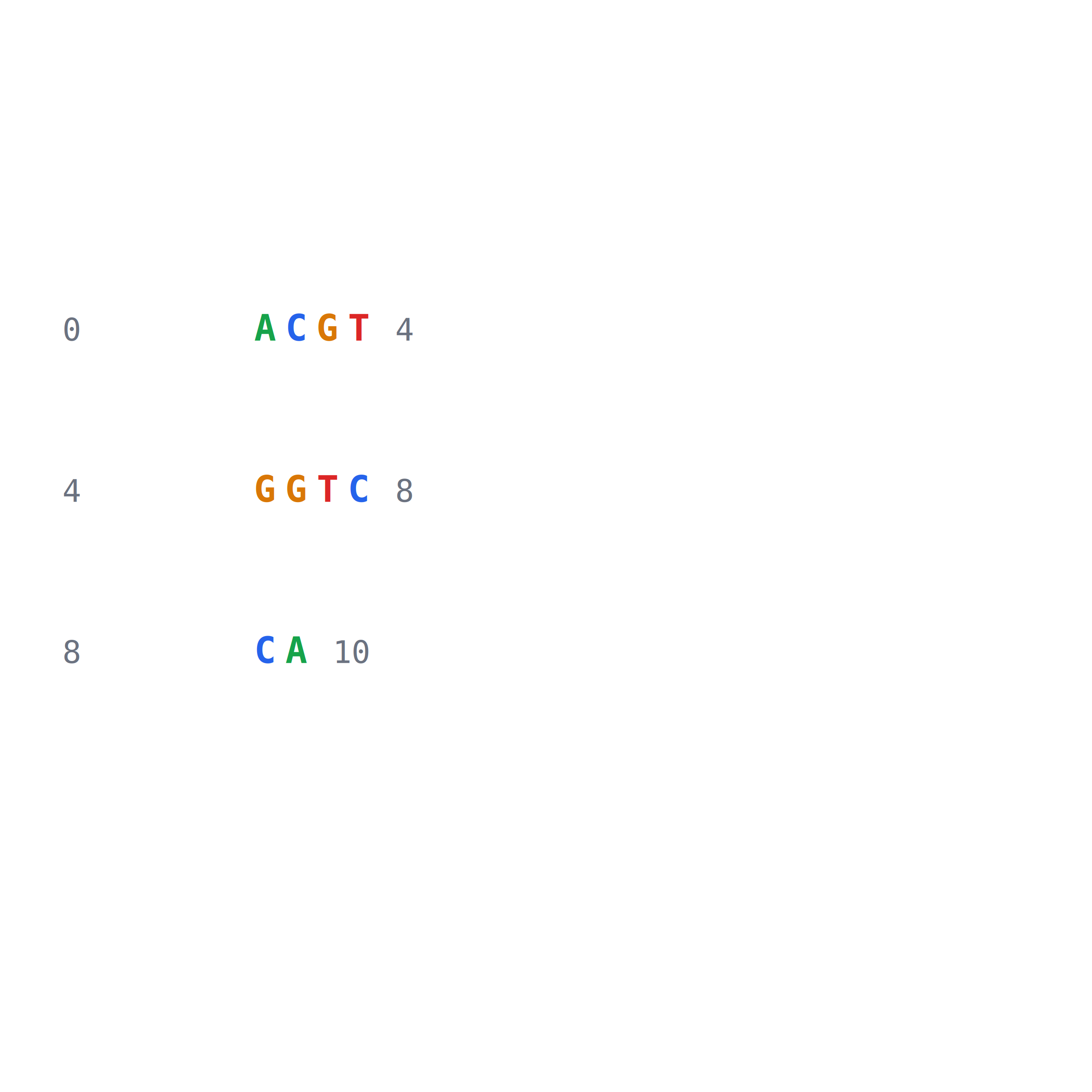
- Method: Lay out bases by row and render symbols, coordinates and optional complements.
- API:
dnakit.visualization.plot_sequence(value[required], highlights[optional], config[optional]);configusesdnakit.visualization.SequencePlotConfig. - Input:
DNASequenceorDNARecord; optional number of bases per row, coordinates, complementary strand, row spacing, column spacing, custom character mapping and display upper limit. - Output: Returns an
SVGArtifact; the example also saves it as an image withsave_image. - Export:
save_image(artifact, target, image_type[optional]); optionalpng,svg,jpg, defaultpng. - Example code:
from dnakit import DNASequence
from dnakit.visualization import SequencePlotConfig, plot_sequence, save_image

artifact = plot_sequence(
    DNASequence("ACGTGGTCCA"),
    config=SequencePlotConfig(bases_per_line=4),
)
save_image(artifact, "viz-001-sequence", image_type="png")
- Example results (
viz-001-sequence.png):
2) position highlighting
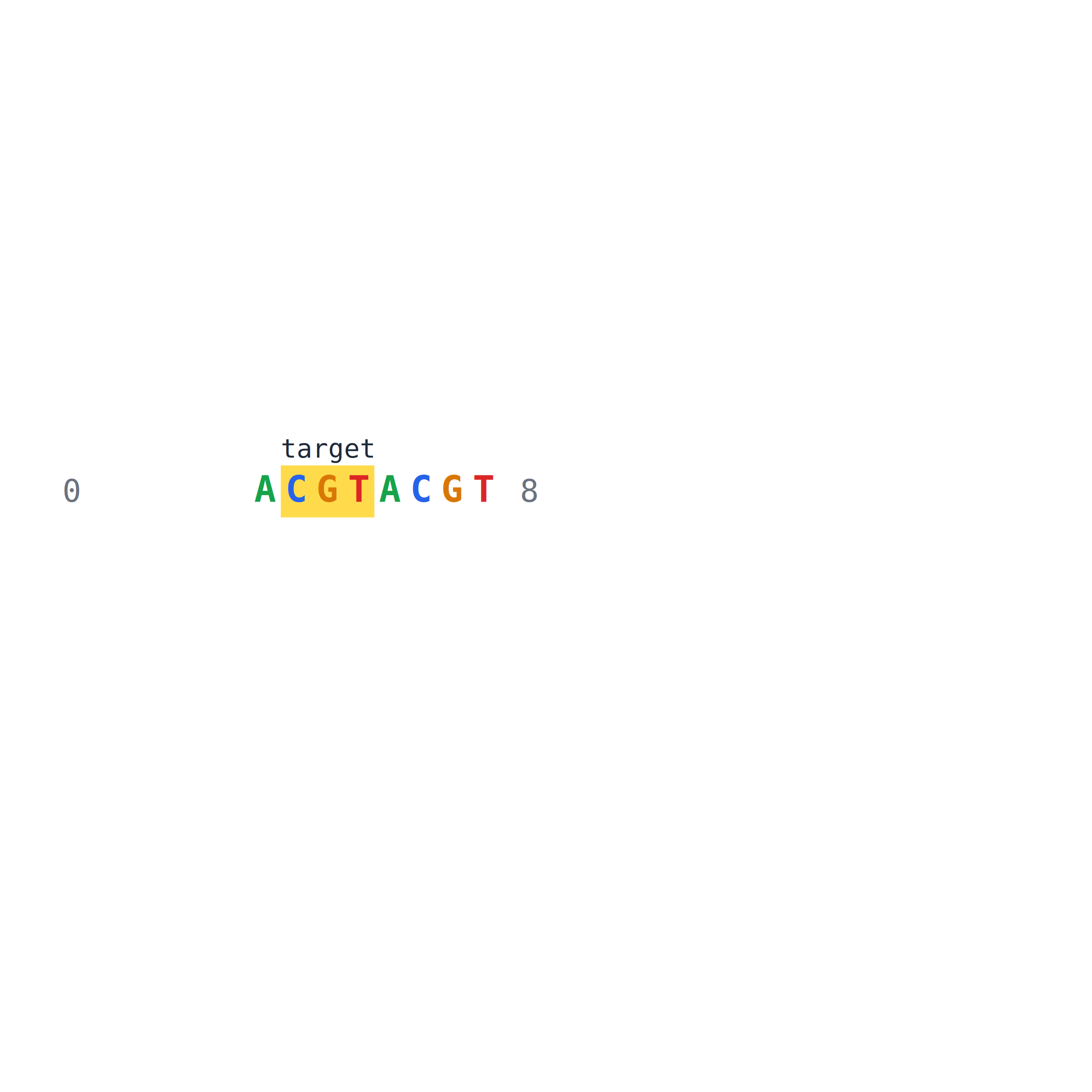
- Purpose: Highlight bases or intervals by coordinates, color, and labels to make motifs, mutations, and other positions of interest clearly visible in sequence diagrams.
- Method: Map half-open intervals to base positions and overlay colors, labels and priority.
- API:
dnakit.visualization.Highlight(start[required], end[required], label[optional], color[optional], foreground[optional], priority[optional], opacity[optional]),dnakit.visualization.plot_sequence(value[required], highlights[optional], config[optional]). - Input: Sequence and highlight interval; optional label, color and priority.
- Output: Returns an
SVGArtifact; the example also saves it as an image withsave_image. - Export:
save_image(artifact, target, image_type[optional]); optionalpng,svg,jpg, defaultpng. - Example code:
from dnakit import DNASequence
from dnakit.visualization import Highlight, plot_sequence, save_image

artifact = plot_sequence(
    DNASequence("ACGTACGT"),
    highlights=[Highlight(1, 4, label="target", color="#ffcc00")],
)
save_image(artifact, "viz-002-highlight", image_type="png")
- Example results (
viz-002-highlight.png):
3) style control
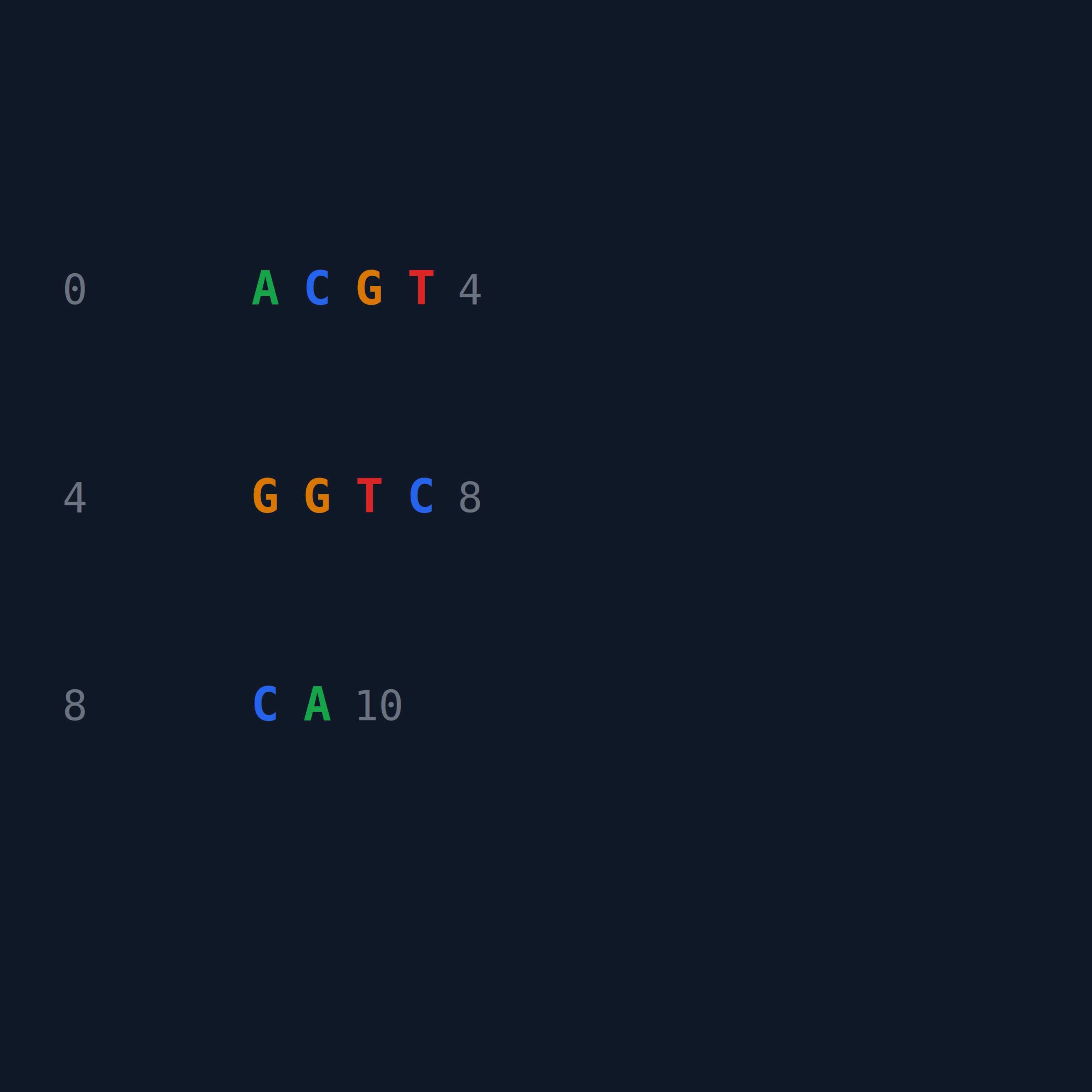
- Purpose: Control color, font, size, margin, line spacing, text column spacing and layout through unified style configuration, so that different visualization results have a consistent appearance and can be reproduced.
- Method: Render SVG elements using the configured fonts, spacing, columns and colors.
- API:
dnakit.visualization.SVGTheme(background[optional], foreground[optional], muted[optional], grid[optional], accent[optional], missing[optional], font_family[optional]); useSequencePlotConfig(font_size[optional], cell_width[optional], line_height[optional], column_spacing[optional], line_spacing[optional], margin[optional], theme[optional])for sequence text images. - Input: drawing configuration;
column_spacingcontrols the horizontal pixels added between adjacent text columns,line_spacingcontrols the vertical pixels added between adjacent sequence lines, both default to0. - Output: Returns an
SVGArtifact; the example also saves it as an image withsave_image. - Export:
save_image(artifact, target, image_type[optional]); optionalpng,svg,jpg, defaultpng. - Example code:
from dnakit import DNASequence
from dnakit.visualization import SVGTheme, SequencePlotConfig, plot_sequence, save_image

theme = SVGTheme(background="#111827", foreground="#f9fafb", accent="#22c55e")
artifact = plot_sequence(
    DNASequence("ACGTGGTCCA"),
    config=SequencePlotConfig(
        bases_per_line=4,
        font_size=18,
        column_spacing=8,
        line_spacing=18,
        theme=theme,
    ),
)
save_image(artifact, "viz-003-theme", image_type="png")
- Example results (
viz-003-theme.png):
4) Gap display
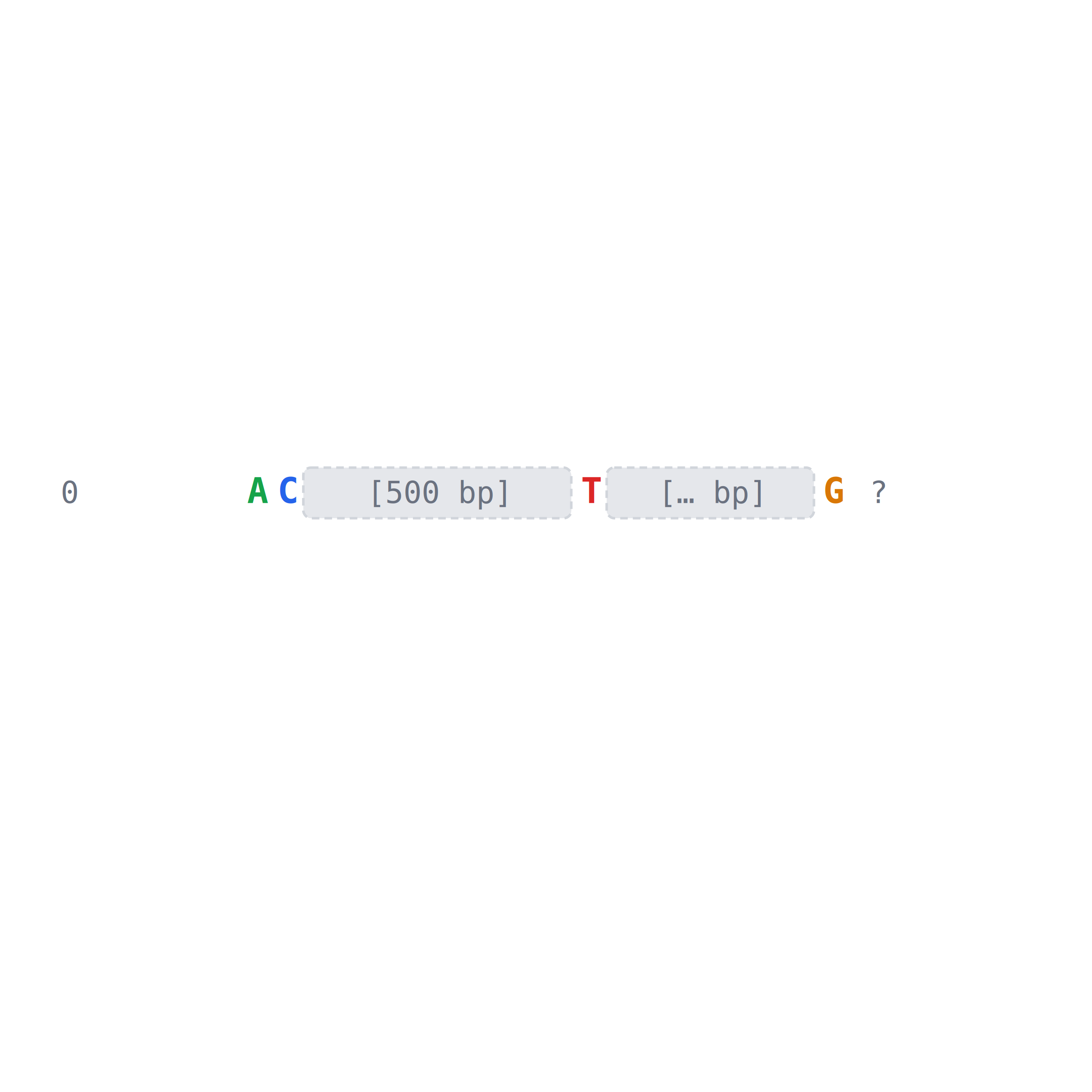
- Purpose: Use special symbols to display the position and known or unknown length of the Gap in the sequence diagram, while maintaining the meaning of the coordinates to avoid mistakenly drawing the missing area as a real base.
- Method: Render gap markers from their length information, distinguishing known and unknown gaps.
- API:
dnakit.Gap(length[required], kind[optional], crossable[optional], evidence[optional], metadata[optional]),dnakit.visualization.plot_sequence(value[required], highlights[optional], config[optional]). - Input:
DNASequenceor record containing explicitGappart. - Output: Returns an
SVGArtifact; the example also saves it as an image withsave_image. - Export:
save_image(artifact, target, image_type[optional]); optionalpng,svg,jpg, defaultpng. - Example code:
from dnakit import DNASequence, Gap
from dnakit.visualization import plot_sequence, save_image

sequence = DNASequence(["AC", Gap(500), "T", Gap(None), "G"])
artifact = plot_sequence(sequence)
save_image(artifact, "viz-004-gap", image_type="png")
- Example results (
viz-004-gap.png):
5) Linear sequence diagram
- Purpose: Draw the start and end range, direction and label of the feature along linear DNA coordinates to generate an SVG similar to a gene structure diagram, which can be used to view the relative positions of multiple annotations.
- Method: Map feature intervals to linear canvas coordinates and render annotations by strand.
- API:
dnakit.visualization.plot_linear_map(value[required], width[optional], height[optional], max_features[optional], title[optional], theme[optional]); the canvas side length takes the larger value betweenwidthandheight,titleis only used as an SVG accessibility description. - Input: resolved linear
DNASequenceorDNARecordwithDNAFeature; output is always square. - Output: Returns an
SVGArtifact; the example also saves it as an image withsave_image. - Export:
save_image(artifact, target, image_type[optional]); optionalpng,svg,jpg, defaultpng. - Example code:
from dnakit import DNAFeature, DNARecord, DNASequence, Interval
from dnakit.visualization import plot_linear_map, save_image

record = DNARecord(
    DNASequence("ACGTACGT"),
    "linear",
    features=[DNAFeature("gene", Interval(1, 6))],
)
artifact = plot_linear_map(record)
save_image(artifact, "viz-005-linear-map", image_type="png")
- Example results (
viz-005-linear-map.png):

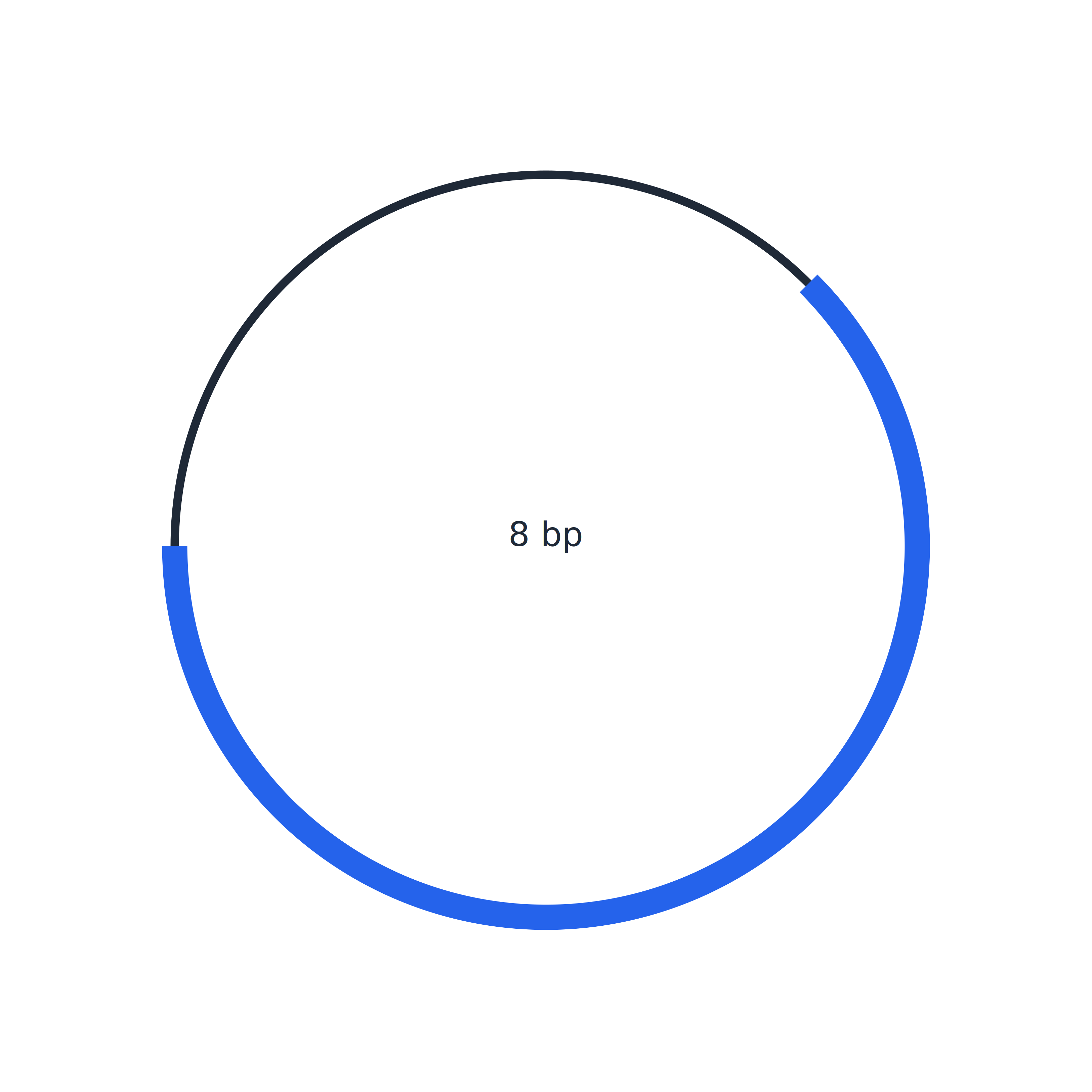
6) Circular DNA diagram
- Purpose: Map circular DNA and its features to circular coordinates, display the direction, span-origin interval and label, which can be used for structural overview of plasmids or other circular molecules.
- Method: Convert positions to angles and draw feature intervals as oriented arcs.
- API:
dnakit.visualization.plot_circular_map(value[required], size[optional], max_features[optional], title[optional], theme[optional]);sizeis the side length of the square canvas,titleis just an SVG accessibility specification. - Input: The resolved sequence or record of
topology="circular". - Output: Returns an
SVGArtifact; the example also saves it as an image withsave_image. - Export:
save_image(artifact, target, image_type[optional]); optionalpng,svg,jpg, defaultpng. - Example code:
from dnakit import DNAFeature, DNARecord, DNASequence, Interval
from dnakit.visualization import plot_circular_map, save_image

record = DNARecord(
    DNASequence("ACGTACGT", topology="circular"),
    "plasmid",
    features=[DNAFeature("gene", Interval(1, 6))],
)
artifact = plot_circular_map(record)
save_image(artifact, "viz-006-circular-map", image_type="png")
- Example results (
viz-006-circular-map.png):
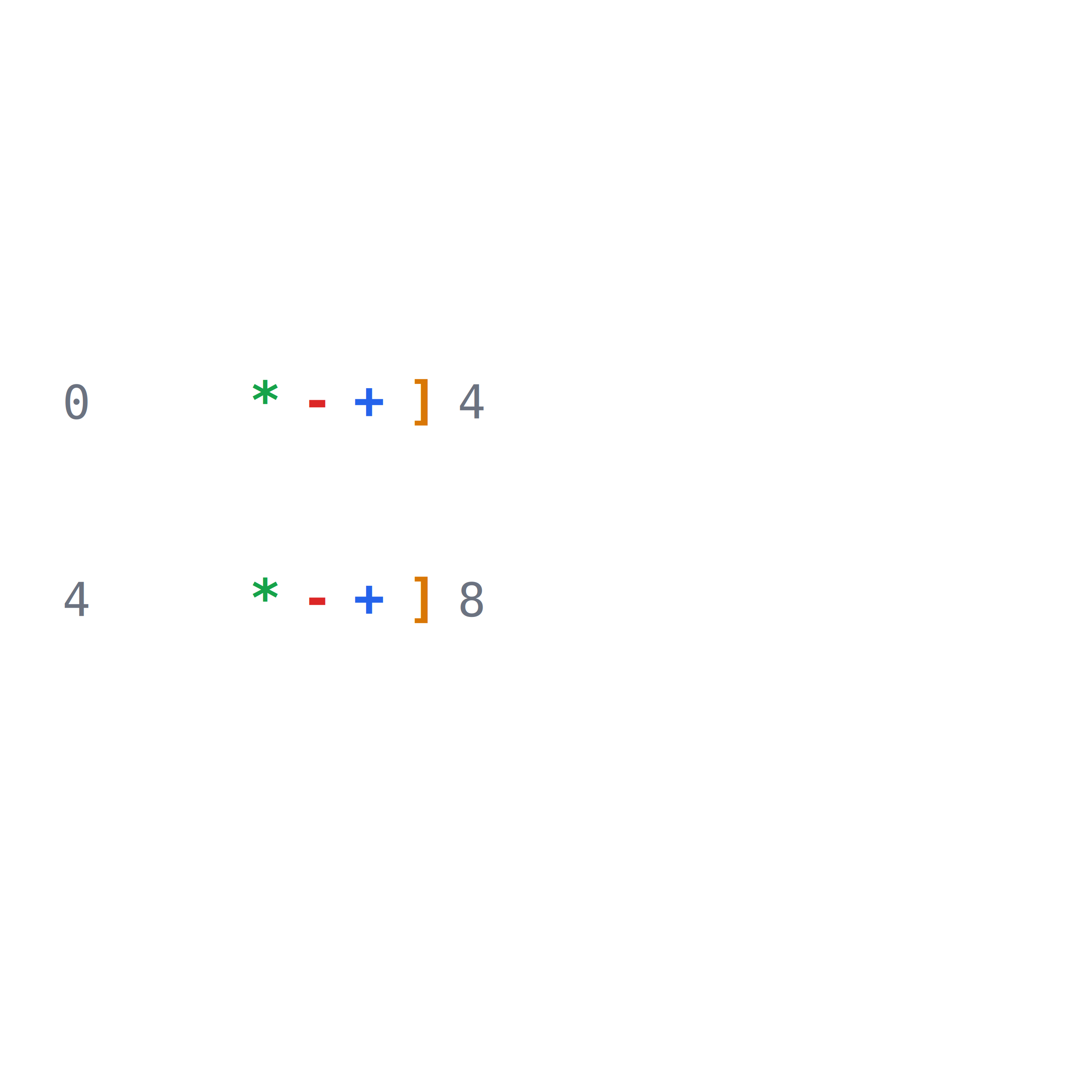
7) Custom character representation
- Purpose: Replace A, T, C, G or IUPAC symbols with the display characters specified by the caller, for example, A is displayed as
*, T is displayed as-, C is displayed as+, and G is displayed as]; coordinates, highlighting, complementary relationships and base colors are still calculated according to the original sequence. - Method: Compute positions and colors from original bases, then replace displayed characters through symbol_map.
- API:
dnakit.visualization.SequencePlotConfig(symbol_map[optional]); used viaplot_sequence(value, config=config). - Input: The key for
symbol_mapis an uppercase DNA/IUPAC symbol and the value is a visible character; unconfigured symbols remain as is and the default mapping is empty. - Output: Returns an
SVGArtifact; the example also saves it as an image withsave_image. - Export:
save_image(artifact, target, image_type[optional]); optionalpng,svg,jpg, defaultpng. - Example code:
from dnakit import DNASequence
from dnakit.visualization import SequencePlotConfig, plot_sequence, save_image

artifact = plot_sequence(
    DNASequence("ATCGATCG"),
    config=SequencePlotConfig(
        bases_per_line=4,
        font_size=20,
        column_spacing=8,
        line_spacing=14,
        symbol_map={"A": "*", "T": "-", "C": "+", "G": "]"},
    ),
)
save_image(artifact, "viz-007-custom-symbols", image_type="png")
- Example results (
viz-007-custom-symbols.png):
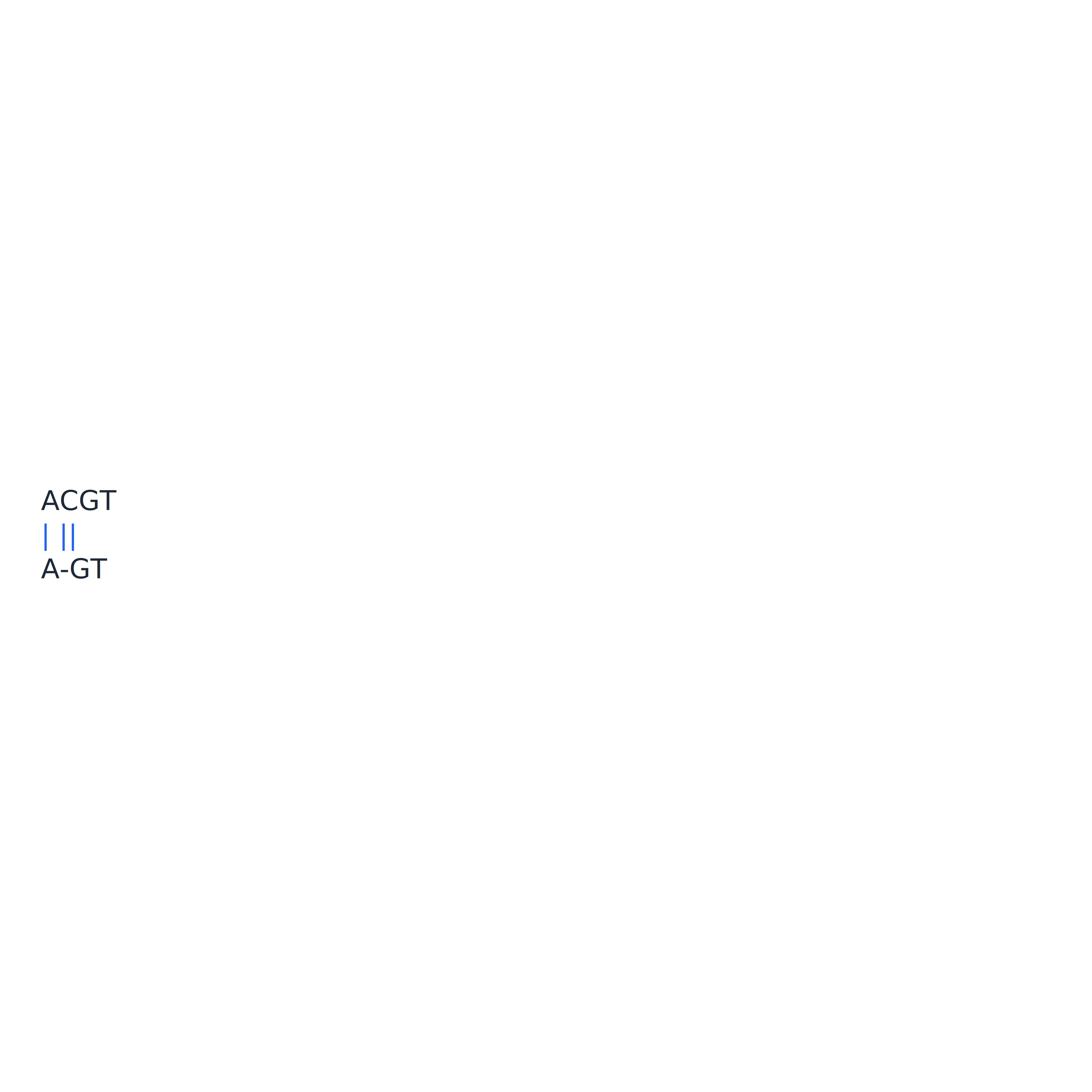
8) Alignment diagram
- Purpose: Draw two paired sequences in columns, distinguish matches, mismatches, insertions and deletions, and display coordinates to facilitate manual inspection of difference positions.
- Method: Render both aligned sequences column by column, including gaps and match/mismatch markers.
- API:
dnakit.visualization.plot_alignment(result[required], columns_per_line[optional], max_columns[optional], theme[optional]). - Input: precomputed
AlignmentResult; optional number of rows and upper bounds, output always square. - Output: Returns an
SVGArtifact; the example also saves it as an image withsave_image. - Export:
save_image(artifact, target, image_type[optional]); optionalpng,svg,jpg, defaultpng. - Example code:
from dnakit import DNASequence
from dnakit.alignment import align_pairwise
from dnakit.visualization import plot_alignment, save_image

alignment = align_pairwise(DNASequence("ACGT"), DNASequence("AGT"))
artifact = plot_alignment(alignment, columns_per_line=4)
save_image(artifact, "viz-008-alignment", image_type="png")
- Example results (
viz-008-alignment.png):
9) Classification and regression sample distributions
- Purpose: Plot category or numeric-bin proportions for one data column.
- Method: Count valid samples per category/bin and divide by the total valid count; the proportions sum to 1.
- API:
dnakit.visualization.plot_distribution(values, task=..., config=...);plot_csv_distributions(source, columns=..., task=..., config=...)reads named CSV columns. - True vs. predicted:
plot_label_comparison(true_labels, predicted_labels, config=..., output=..., overwrite=...)accepts two equal-length label lists and draws paired proportion bars for each class.DistributionPlotConfig(categories=("0", "1"), show_values=True)fixes class order and displays percentages above the bars. Passoutput="comparison.svg"to save during plotting; the suffix selects the format and existing files are protected by default. The returnedmetadatacontains separate counts and proportions; blanks are excluded from each series denominator. - Input: Category labels, numeric values, or a CSV with a header.
probabilityvalues must be in[0,1]; non-finite numeric values are rejected. - Output: Returns
SVGArtifact;metadatacontains counts and proportions for each category or interval. - Example code:
from dnakit.visualization import plot_distribution

result = plot_distribution([0, 1, 1, 2, 2], task="classification")
print(result.metadata["counts"])
print(result.metadata["proportions"])

from dnakit.visualization import DistributionPlotConfig, plot_label_comparison

comparison = plot_label_comparison(
    [0, 0, 1, 1], [0, 1, 1, 1],
    config=DistributionPlotConfig(categories=("0", "1"), show_values=True),
    output="label_comparison.svg",
    overwrite=True,
)
print(comparison.metadata["true_proportions"])
print(comparison.metadata["predicted_proportions"])
- Example output:
Compare metrics from CSV
plot_metric_comparison_csv reads a CSV with model,mean; optional se and source columns provide standard errors and groups. A CSV path and output image path are enough to plot; the output suffix selects SVG, PNG, or PDF. Plotting requires the optional bio-plots dependency. Use fold_csvs to compute means and standard errors from per-fold metric CSVs, and test_csv to add test results. Each source appears in a separate panel.
from dnakit.visualization import plot_metric_comparison_csv

plot_metric_comparison_csv("metrics.csv", output="comparison.svg", metric_label="MCC")
Plot a confusion matrix from prediction CSV
plot_confusion_matrix_csv needs only one CSV with true labels in label and predicted labels in prediction. Rows are true classes and columns are predicted classes. The left panel shows sample counts; the right panel shows proportions within each true class. Use labels to fix the class order and retain classes absent from the current data. Passing output saves the image directly. SVG needs no plotting extra; PNG/PDF export needs the optional viz dependency.
from dnakit.visualization import plot_confusion_matrix_csv

plot_confusion_matrix_csv(
    "predictions.csv",
    labels=("0", "1"),
    output="confusion.svg",
    overwrite=True,
)
Use true_column and predicted_column if the CSV uses different headers. The returned SVGArtifact.metadata contains counts, row_normalized, and row_totals.
Plot learning curves from an epoch CSV
plot_learning_curves_csv reads one CSV, draws training and validation loss and MCC curves, and saves the figures. Required columns are epoch,train_loss,validation_loss,train_mcc,validation_mcc. Optional dataset,setting,method,fold columns identify the dataset, configuration, method, and cross-validation fold. Values from multiple folds at the same epoch are averaged; shading shows the sample standard deviation. Blank metric cells are skipped. For multiple dataset/setting groups, pass an output directory to save one SVG per group. With one group, the output may instead be an explicit .svg, .png, or .pdf path. This function requires the optional bio-plots dependency.
dataset,setting,method,fold,epoch,train_loss,validation_loss,train_mcc,validation_mcc
enhancers,baseline,full,0,1,0.54,0.50,0.59,0.52
enhancers,baseline,full,1,1,0.56,0.48,0.57,0.54
from dnakit.visualization import plot_learning_curves_csv

plot_learning_curves_csv("epochs.csv", output="figures", overwrite=True)
This example creates figures/enhancers_baseline.svg. Without grouping columns, one CSV produces one figure.
Plot prediction errors from DNA embeddings and a CSV
plot_embedding_errors reads one embedding NPZ and one CSV with id,error, aligns rows by sample ID, projects the embeddings to two dimensions, and highlights prediction errors. The NPZ must contain embeddings (a numeric matrix) and ids; splits (train/test) and labels are optional. If train rows exist, scaling and PCA fit on train and the plot shows test rows; otherwise all rows are projected. The CSV must cover every plotted ID. error accepts correct, FP, FN, error, or 0/1. An optional method column creates one SVG per model. Optional label, prediction, and probability columns add details; prediction values are checked against error labels. Requires bio-analysis and bio-plots.
from dnakit.visualization import plot_embedding_errors

plots = plot_embedding_errors("embeddings.npz", "predictions.csv")
# Writes predictions/full.svg by default; use output_dir to choose a directory.
Set n_clusters=5, save_details=True to also save the PCA projection, point CSVs, and a per-cluster error-rate CSV. Use overwrite=True to replace existing outputs.
10) Plot a phylogenetic tree
- Purpose: View branch lengths and tip labels, then save the tree as an image.
- Method: Draw branches and tip labels with Matplotlib.
- API:
dnakit.bioinformatics.phylogeny.plot_tree(tree) - Input: A
TreeNodetree; requiresbio-plots. This example creates its own tree. - Output: Returns Matplotlib
Axes; save the tree plot through itsfigure. - Example code:
from dnakit.bioinformatics.phylogeny import TreeNode, plot_tree

tree = TreeNode(children=(TreeNode("a", 1), TreeNode("b", 1)))
axes = plot_tree(tree)
print(type(axes).__name__)
axes.figure.savefig("tree.png")
- Example output:
The tree plot is saved to tree.png.
Dependencies and implementation notes.
11) Plot sequence dotplots
- Purpose: Visualize repeats and reverse-complement matches between sequences or within one sequence.
- Method: Find exact k-mer matches on either strand and plot their coordinates.
- API:
dnakit.bioinformatics.motifs.dotplot(left, right=None, word_length=10, max_matches=1000000) - Input: One or two sequences and a word length; requires
bio-plots. - Output: Returns Matplotlib
Axesshowing the sequence dotplot. - Example code:
from dnakit.bioinformatics.motifs import dotplot

axes = dotplot("ACGTACGT", "ACGTTCGT", word_length=3)
print(type(axes).__name__)
# axes.figure.savefig("dotplot.png")
- Example output:
Dependencies and implementation notes.
12) Plot Sanger chromatograms
- Purpose: View the base-channel signals from a Sanger read and save the chromatogram.
- Method: Plot ABI signal channels and base annotations with Matplotlib.
- API:
dnakit.bioinformatics.cloning.plot_chromatogram(trace) - Input: A trace dictionary returned by
read_sanger; this example reads an existingread.ab1and requiresbio-formatsandbio-plots. - Output: Returns Matplotlib
Axesthat can be saved as a Sanger chromatogram. - Example code:
from dnakit.bioinformatics.cloning import read_sanger, plot_chromatogram

trace = read_sanger("read.ab1")
axes = plot_chromatogram(trace)
axes.figure.savefig("chromatogram.png")
- Example output:
The chromatogram is saved to chromatogram.png. Requires an actual ABI file; this example was not executed.
Dependencies and implementation notes.
13) Plot qualitative gel bands
- Purpose: Preview band patterns for multiple lanes from fragment lengths.
- Method: Map log(fragment length) to migration position, assuming equal input amounts.
- API:
dnakit.bioinformatics.cloning.simulate_gel(lanes, min_bp=100, max_bp=10000) - Input: A length list or linear
Duplexlist per lane; requiresbio-plots. Intended for qualitative illustration. - Output: Returns Matplotlib
Axesshowing simulated bands in each lane. - Example code:
from dnakit.bioinformatics.cloning import simulate_gel

axes = simulate_gel([[500, 1000, 2000], [750, 1500]])
print(type(axes).__name__)
# axes.figure.savefig("gel.png")
- Example output:
Dependencies and implementation notes.
Save Matplotlib figures
Use dnakit.visualization.save_figure(figure, target, overwrite=False, tight_layout=True, close=True, **kwargs) for an existing Matplotlib Figure. The suffix selects SVG, PNG, PDF or another Matplotlib format. It creates parent directories, stages output, applies tight layout and closes the figure by default. Extra arguments such as dpi go to Figure.savefig. SVG/PDF timestamps are omitted unless metadata is explicitly supplied.
import matplotlib.pyplot as plt
from dnakit.visualization import save_figure

figure, axes = plt.subplots()
axes.plot([1, 2, 3], [0.2, 0.4, 0.5])
axes.set(xlabel="Epoch", ylabel="Validation MCC")
save_figure(figure, "output/mcc.svg", overwrite=True)
This requires Matplotlib. Continue using save_svg / save_image for DNAKit SVGArtifact objects.