Tutorial details
Quick-start pages show purpose, method, API, inputs and examples. Background, compatibility APIs, installation and advanced usage are collected here.
Core objects and compatibility
Ordinary users only need to remember one core object: dnakit.DNA(...). This entry is used to input one sequence or multiple sequences, ID, topology, metadata and feature, and the return type is always DNA.
import dnakit

# One sequence
dna = dnakit.DNA("ACGT")

# One sequence with attached information
annotated = dnakit.DNA(
    "ACGT",
    id="seq-1",
    topology="circular",
    metadata={"species": "synthetic"},
    features=[{"type": "motif", "start": 1, "end": 3}],
)

# Multiple sequences, still returning DNA
dataset = dnakit.DNA(["ACGT", "TTAA"])
detailed = dnakit.DNA(
    [
        {"sequence": "ACGT", "id": "seq-1"},
        {"sequence": "TTAA", "id": "seq-2", "topology": "circular"},
    ]
)

print(type(dna).__name__, type(dataset).__name__)
print(dataset.ids, dataset[0].symbols)
There are only three usage rules: a string represents a sequence; a string list represents multiple sequences; when multiple sequences require different additional information, use a dictionary list containing sequence. data[0] and data[1:3] still return DNA. The following DNASequence, DNARecord and DNASet are internally clearly layered and compatible with old code objects, and do not need to be constructed separately for normal use.
Large files and indexing
Large file parameters and advanced indexing
- Ordinary users: Use the same
dnakit.read(..., mode="stream")to read one by one, and then pass the returned data stream directly todnakit.write(); useiter_chunks()only when fixed chunking is required.
import dnakit

with dnakit.read("large.fa", mode="stream") as records:
    dnakit.write(records, "copy.fa")
- Advanced users: Only use the index interface when you need to randomly access large FASTA/FASTQ by record ID or coordinates; these interfaces are not required for ordinary file reading.
- Advanced API:
dnakit.io.iter_chunks(values[required], chunk_size[required]),dnakit.io.build_fasta_index(source_path[required], index_path[optional], overwrite[optional], max_records[optional], max_line_length[optional]),dnakit.io.load_fasta_index(index_path[required], source_path[optional], verify_checksum[optional], max_index_bytes[optional]),dnakit.io.build_fastq_index(source_path[required], index_path[optional], overwrite[optional], phred_offset[optional], max_records[optional], max_line_length[optional], max_record_bytes[optional], max_source_bytes[optional]),dnakit.io.load_fastq_index(index_path[required], source_path[optional], verify_checksum[optional], max_index_bytes[optional], max_entries[optional]),dnakit.io.FastaIndex.fetch(record_id[required], start[optional], end[optional], strand[optional], max_record_bytes[optional]),dnakit.io.FastqIndex.fetch(record_id[required], start[optional], end[optional], strand[optional], max_record_bytes[optional]).
File API compatibility
Read and write common DNA sequences, annotations, tables, and compressed files. Ordinary users only need to remember dnakit.read() when reading a sequence file, and only need to remember dnakit.write() when writing out; when the file is large, the same method is still used, and only the reading parameter is set to mode="stream".
Large files are not a new file format and do not require new common read and write entries. Streaming, chunking, and indexing capabilities are part of the large-file usage of sequence formats.
The read interface preserves input order by default.
Thermodynamic model details
1) molecular weight
- Calculation type: Theoretical formula calculation.
2) 260 nm extinction coefficient
-
Calculation type: Empirical parameter calculation.
-
Calculation caliber: For sequences with a length of at least 2, use "the sum of all adjacent dinucleotide coefficients, minus the sum of all internal single base coefficients"; single nucleotides use their single base coefficients directly. The reference conditions of the parameter table are 25 °C, pH 7, and the unit is
M⁻¹·cm⁻¹, which is equivalent toL·mol⁻¹·cm⁻¹. The result of 40,300 forACGTis consistent with the published study.
3) melting temperature Tm
- Calculation type: Empirical model estimation.
4) salt concentration correction
- Calculation type: Empirical formula.
5) local melting characteristics
- Calculation type: Sliding window calculation.
6) Synthetic risk
- Calculation Type: Deterministic Rule Score.
1) thermodynamic parameters
- Calculation type: Thermodynamic model estimation.
2) Nearest-neighbor
- Calculation type: Thermodynamic model estimation.
3) Duplex stability
- Calculation type: Thermodynamic model estimation.
4) base stacking
- Calculation type: Parameter table calculation.
5) Hairpin
- Calculation type: Primer3 structure prediction.
6) Self-dimer
- Calculation type: Primer3 structure prediction.
7) Heterodimer
- Calculation type: Primer3 structure prediction.
Pattern terminology
-
Meaning: A motif is a short sequence pattern with certain characteristics in DNA, which can be understood as a "keyword" in the DNA sequence.
-
Meaning: A start codon indicates where protein translation may begin, and a stop codon indicates where protein translation ends.
-
Meaning: A promoter is a regulatory region that helps genes start to be transcribed; the promoter motif is a common short sequence feature and can be understood as a "start mark" for gene transcription.
-
Meaning: TF motif is a DNA sequence pattern that transcription factors preferentially recognize and bind to, and may be involved in regulating whether genes are expressed and how strongly they are expressed.
-
Meaning: Restriction enzyme sites are specific DNA sequences that restriction enzymes can recognize and cut. They can be understood as the cutting positions of "molecular scissors".
-
Meaning: PAMs are short tags immediately adjacent to CRISPR target sequences, and Cas proteins typically need to recognize PAMs before they can bind and cut nearby DNA.
-
Meaning: A DNA palindrome is a segment that is identical to its own reverse complement, for example
GAATTC. -
Meaning: Inverted repeats are two DNA segments that are reverse complementary to each other and may be separated by a sequence. They may fold to form a hairpin structure.
-
Meaning: Tandem repetition is the same short sequence unit appearing end to end and appearing multiple times in a row. For example,
ATATATisATrepeated 3 times in a row. -
Meaning: Microsatellites, also known as STRs, are short tandem repeats with repeating units 1–6 bp in length, such as
CACACACA.
Plot export and dependencies
Plot DNA sequences, positions, alignments, similarity matrices, and classification/regression sample distributions from CSV files into images that can be saved.
For CSV input, column selection, and sample proportion plots, see 9) Classification and regression sample distributions.
The plotting function returns a deterministic square SVGArtifact, and decorative titles such as "DNA sequence" are not displayed in the plot; data content such as coordinates, highlight labels, legends, and base numbers are still retained. The title in the configuration is only used for SVG accessibility instructions and will not be drawn within the image. All graphics are exported using save_image(); image_type can be selected from png, svg or jpg, and the default is png. If the target path does not have an extension, it will be automatically added. SVG does not require additional graphics dependencies, PNG/JPG needs to install viz extra; the original TIFF/PDF export continues to be compatible. Each example below will save the image to the current working directory. The "example result" shows the real image generated by the same code; the save function refuses to overwrite existing files by default.
Distribution plots: CSV, CLI and style
9) Classification and regression sample distributions
Read one or more CSV columns and plot each column's sample proportions separately. Bar height = samples in a category or interval ÷ valid samples in that column. The y-axis shows percentages, and the bars in each plot sum to 100% (rounded labels may differ slightly). This is a data distribution, not the model's prediction confidence for an individual sample.
| Mode | Input column | Meaning of each bar |
|---|---|---|
classification |
Category labels such as 0, 1, 2, or strings |
One bar per category; the number of categories expands automatically |
regression |
Continuous numeric values | One bar per numeric interval; 30 equal-width bins by default |
probability |
Predicted probabilities in [0,1] |
Numeric bins with additional rejection of out-of-range probabilities; raw values are not normalized |
Select task="probability" explicitly for probability columns; the CSV API and CLI (--task probability) also support it.
For example, plot_distribution([0, 0.5, 1], task="probability", config=DistributionPlotConfig(bin_edges=[0, 0.5, 1]))
produces counts [1, 2]. Missing values are excluded from the valid-sample denominator; NaN/Inf and out-of-range values are rejected.
Ordinary regression still permits negative numbers. Range checks cannot identify logits that happen to fall in [0,1], so select the correct column.
CSV example and statistical rules
The complete example CSV, at docs/assets/data/distribution.csv, contains 200 artificially generated demonstration samples. The label column has 40, 100, and 60 samples in classes 0, 1, and 2; score and score_alt contain continuous values. The first CSV row must contain column names, which are matched exactly.
- Each column is counted independently. A single call uses the same mode and style for all selected columns; call separately for mixed classification and regression columns.
- Empty cells, whitespace-only strings, and Python
Nonevalues are skipped. Results record the missing count, which the CLI also reports. An entirely empty column raises an error. - Nonnumeric regression values,
NaN, andinfraise errors instead of being treated as missing. Classification preserves label text:0and0.0are distinct categories, and surrounding whitespace is stripped. - Categories follow first-appearance order by default. An explicit order may include absent categories with 0% proportions, but must include every observed category.
- Regression intervals are left-closed and right-open
[a, b), except the last interval includes its right endpoint. A constant column produces one interval containing 100% of samples. - Custom bin edges must be strictly increasing and cover all valid values; out-of-range values raise an error. Even with unequal bin widths, bar heights show sample proportions, not probability density.
- Defaults allow up to 1,000,000 input rows and 1,000 categories/intervals. Exceeding a limit raises an error instead of truncating statistics. Dense plots reduce tick labels while retaining every bar.
CLI: category proportions
Run from the project root in an environment with DNAKit installed. If needed, first run python -m pip install -e ".[viz]". SVG export only needs the base installation; PNG/JPG/PDF and other rendered formats use the viz dependencies.
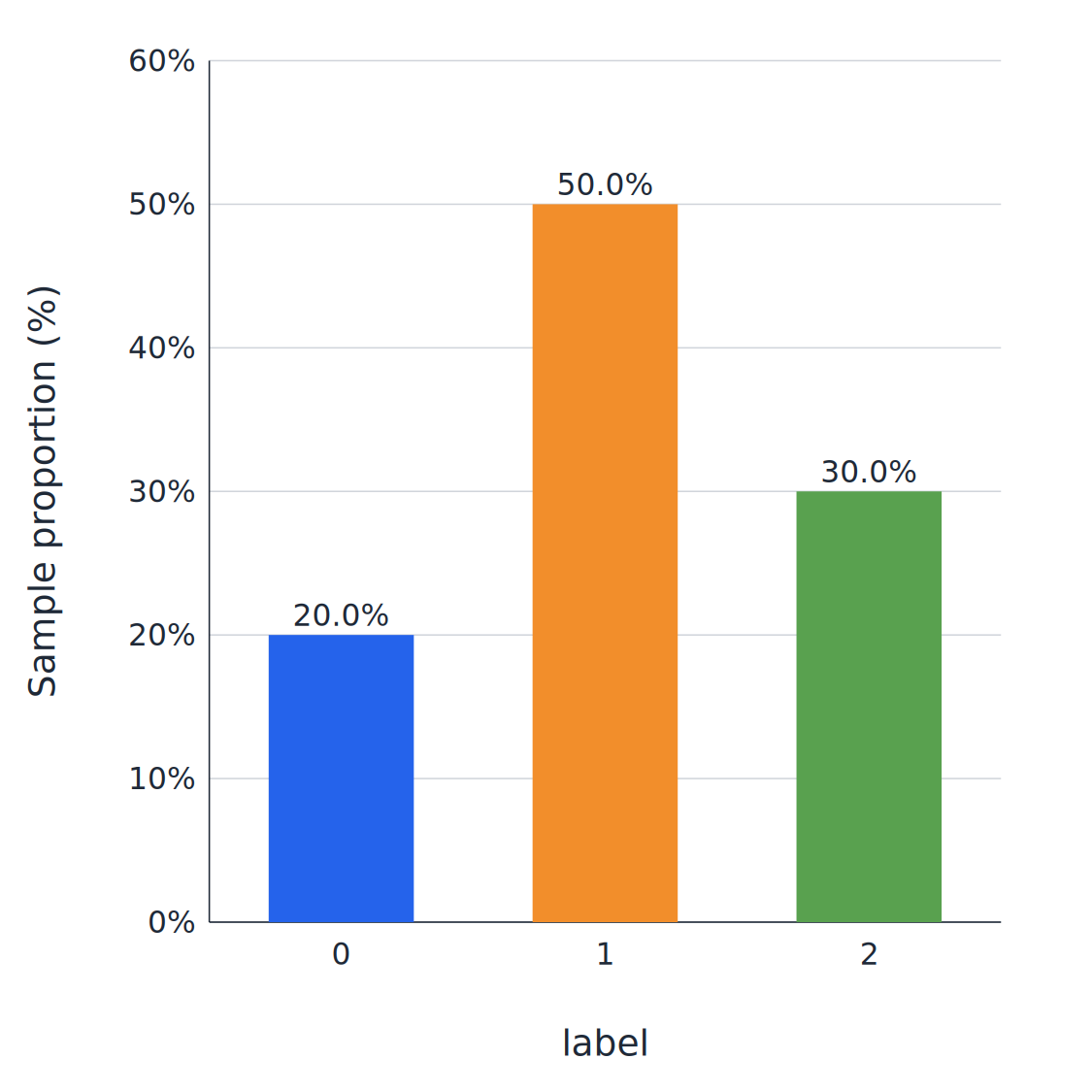
Count categories in label, display them in order 0, 1, 2, show percentages above the bars, and save as PNG:
python -m dnakit.cli plot-distribution \
  --input docs/assets/data/distribution.csv \
  --column label \
  --task classification \
  --output outputs/label_distribution.png \
  --category 0 \
  --category 1 \
  --category 2 \
  --show-values \
  --dpi 150
The three bars show 20%, 50%, and 30%.
CLI: regression value distributions
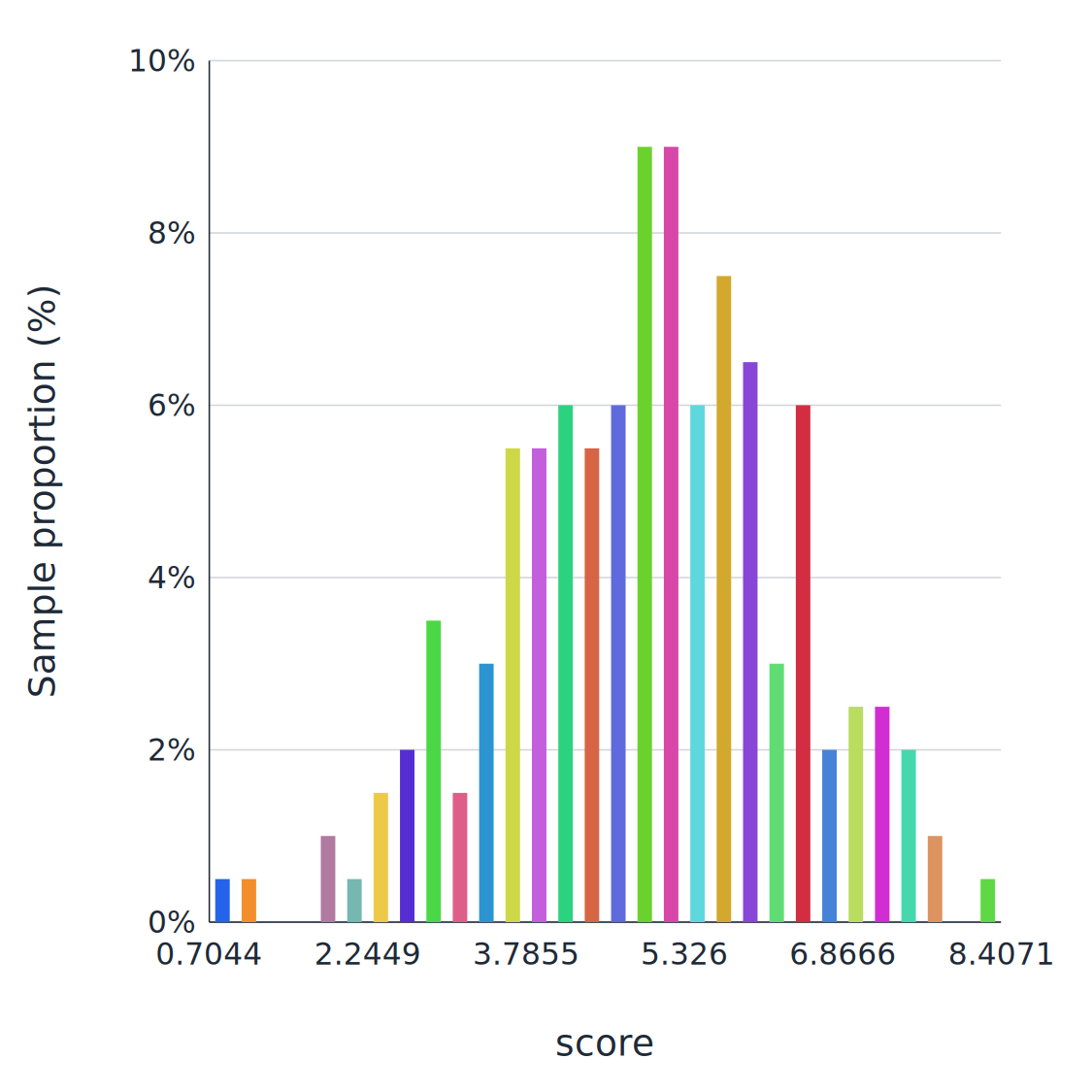
Count proportions in 30 equal-width intervals for score, and save a PNG with the default multicolored bars:
python -m dnakit.cli plot-distribution \
  --input docs/assets/data/distribution.csv \
  --column score \
  --task regression \
  --output outputs/score_distribution.png \
  --bins 30 \
  --dpi 150
Read two columns in one call, count them independently, and save each to its specified SVG file. Each --column corresponds to an --output in occurrence order.
python -m dnakit.cli plot-distribution \
  --input docs/assets/data/distribution.csv \
  --column score \
  --column score_alt \
  --task regression \
  --output outputs/score.svg \
  --output outputs/score_alt.svg \
  --bins 25
Use --bin-edges '0,2,4,6,8,10' for custom intervals; it takes precedence over --bins. For a negative first edge, use --bin-edges=-10,-5,0,5,10,15 to avoid parsing it as an option. The two example columns determine their ranges independently; supply common --bin-edges to compare the same intervals.
Python API and styling
By default, every bar has a distinct color and occupies 55% of its category slot or bin width. Axis labels use font size 24; ticks and bar percentages use 20, with sans-serif typography. Automatic colors follow display order and expand for more categories; specify categories to fix the category order. These defaults apply to classification bar charts and regression histograms without repeating settings in scripts.
Customize colors with DistributionPlotConfig(bar_colors=("#2563eb", "#f28e2b")); palettes shorter than the bar count repeat. The CLI equivalent is --bar-color "#2563eb" --bar-color "#f28e2b", mutually exclusive with the uniform-color --color option.
plot_csv_distributions(source, columns=..., task=..., config=...) returns {column_name: SVGArtifact}. For an existing list, use plot_distribution(values, task=..., config=...). Specify the output filename and format with save_image().
from dnakit.visualization import (
    DistributionPlotConfig,
    ImageExportConfig,
    plot_csv_distributions,
    save_image,
)

plots = plot_csv_distributions(
    "docs/assets/data/distribution.csv",
    columns=["label"],
    task="classification",
    config=DistributionPlotConfig(
        categories=("0", "1", "2", "3"),  # Absent class 3 has a proportion of 0%
        size=800,
        show_values=True,
        x_label="Class",
    ),
)
artifact = plots["label"]
print(artifact.metadata["counts"])       # (40, 100, 60, 0)
print(artifact.metadata["proportions"])  # (0.2, 0.5, 0.3, 0.0)
save_image(
    artifact,
    "outputs/custom_distribution.png",
    config=ImageExportConfig(dpi=150, create_parents=True),
)
| Configuration / CLI option | Default | Purpose |
|---|---|---|
bins / --bins |
30 |
Number of equal-width regression bins |
bin_edges / --bin-edges |
None |
Custom regression edges, overriding bins |
categories / repeated --category |
None |
Category order and optional zero-count categories |
size / --size |
720 |
Square SVG canvas side, at least 320 |
font_size / --font-size |
24 |
Axis label font size |
tick_font_size / --tick-font-size |
20 |
Tick label font size |
value_font_size / --value-font-size |
20 |
Bar percentage font size |
theme.font_family / --font-family |
sans-serif |
Installed font family; Noto Sans CJK SC supports Chinese |
theme.accent |
#2563eb |
First automatic bar color; remaining bars receive distinct colors |
bar_colors / repeated --bar-color |
None (automatic multicolor) |
Custom repeating palette; use bar_colors=("#2563eb",) or CLI --color "#2563eb" for a single color |
theme.background / --background |
#ffffff |
Background color; the API's SVGTheme also controls text and grid colors |
bar_width / --bar-width |
0.55 |
Fraction of the category slot or bin width; 1 means no gaps |
label_rotation / --label-rotation |
0 |
X-axis tick rotation: 0, 45, or 90 degrees |
max_tick_labels / --max-tick-labels |
12 |
X-axis label density; regression reduces overlapping labels based on font size and retains the rightmost edge |
show_values / --show-values |
False |
Show bar percentages; leave disabled for dense histograms |
show_grid / --grid, --no-grid |
True |
Show horizontal grid lines |
x_label / --x-label |
CSV column name | X-axis label |
y_label / --y-label |
Sample proportion (%) |
Y-axis label; values always represent sample proportions |
ImageExportConfig.dpi / --dpi |
600 |
Raster export resolution; default pixel side is approximately size × dpi / 96 |
encoding / --encoding |
utf-8-sig |
CSV encoding, accepting UTF-8 BOM by default |
delimiter / --delimiter |
, |
Single-character CSV delimiter |
max_values / --max-values |
1000000 |
Input row limit, including missing-value rows |
Export supports PNG, SVG, JPG, TIFF, and PDF; extensionless paths receive .png. The CLI creates output parent directories and refuses to overwrite by default; use --overwrite to repeat execution with the same path. As with existing visualizations, title is SVG accessibility text and is not drawn inside the plot.
Embedding models and checkpoints
5.2 Rep of 11 types of neural networks supported
The following model names come directly from the current MODEL_REGISTRY:
| Serial number | model |
rep source | Default official checkpoint | Loading conditions |
|---|---|---|---|---|
| 1 | alphagenome |
AlphaGenome all folds | google/alphagenome-all-folds | Requires acceptance of model terms and installation of official research code |
| 2 | caduceus |
Caduceus-Ph 131k | kuleshov-group/caduceus-ph 131k | neural, neural-caduceus extras; must be explicit allow_remote_code=True |
| 3 | dnabert2 |
DNABERT-2-117M | zhihan1996/DNABERT-2-117M | neural extra; must be explicit allow_remote_code=True |
| 4 | enformer |
Enformer PyTorch | EleutherAI/enformer-official-rough | neural, neural-enformer extras |
| 5 | evo2 |
Evo 2 7B | arcinstitute/evo2_7b | neural, neural-evo2 extras; need to be compatible with GPU environment |
| 6 | generator |
GENERator v2 eukaryote 1.2B | GenerTeam/GENERator-v2-eukaryote-1.2b-base | neural extra; must be explicit allow_remote_code=True |
| 7 | grover |
GROVER | PoetschLab/GROVER | neural extra; completed real checkpoint rep + k-means smoke |
| 8 | hyenadna |
HyenaDNA medium 450k | LongSafari/hyenadna-medium-450k-seqlen-hf | neural extra; must be explicit allow_remote_code=True |
| 9 | janusdna |
JanusDNA 131k | Harvard Dataverse DOI 10.7910/DVN/HDT0RN | checkpoint to verify the official MD5; official source code and model_source_path must also be provided |
| 10 | lucaone (default) |
LucaOne gene step 36.8M | LucaGroup/LucaOne-gene-step36.8M | neural extra; must be explicit allow_remote_code=True |
| 11 | ntv2 |
Nucleotide Transformer v2 500M multi-species | InstaDeepAI/nucleotide-transformer-v2-500m-multi-species | neural extra; must be explicit allow_remote_code=True |
Query all currently registered models, checkpoint will not be downloaded:
('alphagenome', 'caduceus', 'dnabert2', 'enformer', 'evo2', 'generator', 'grover', 'hyenadna', 'janusdna', 'lucaone', 'ntv2')
Embedding cache and loading
By default, checkpoint is downloaded to ckpt/lucaone-gene-step36-8m/ in the current working directory, and is reused directly if the complete file already exists. Downloads and sequence-by-sequence extractions display a progress bar by default; this can be adjusted explicitly with checkpoint_dir, checkpoint_path, or show_progress.
Neural clustering: checkpoints and options
The default model is lucaone, corresponding to checkpoint
LucaGroup/LucaOne-gene-step36.8M. The first time you call it, it will be downloaded by default to the directory where the command is run.
ckpt/lucaone-gene-step36-8m/; If the complete checkpoint already exists, it will be directly reused without repeated downloading.
Each directory will hold a list of .dnakit-checkpoint.json sources. Available checkpoint_dir to modify the cache
root directory, or use checkpoint_path to point to an existing checkpoint directory and skip downloading entirely. Download and
Sequence-by-sequence extraction displays a progress bar by default.
LucaOne checkpoint contains custom Transformers code. DNAKit does not do this implicitly; use
Default model's standard backend must still be set explicitly in RepresentationConfig
allow_remote_code=True.
Extract only rep:
from dnakit.representations import RepresentationConfig, extract_representations

reps = extract_representations(
    records,
    config=RepresentationConfig(allow_remote_code=True),
)
print(reps.representations.shape)
Optional models and official checkpoint
model |
Default official checkpoint | Loading conditions |
|---|---|---|
grover |
PoetschLab/GROVER | neural extra; the local independent model environment has completed the rep + k-means smoke of the real checkpoint |
dnabert2 |
zhihan1996/DNABERT-2-117M | neural extra; requires explicit allow_remote_code=True |
ntv2 |
InstaDeepAI/nucleotide-transformer-v2-500m-multi-species | neural extra; requires explicit allow_remote_code=True |
hyenadna |
LongSafari/hyenadna-medium-450k-seqlen-hf | neural extra; requires explicit allow_remote_code=True |
caduceus |
kuleshov-group/caduceus-ph 131k | neural, neural-caduceus extras; need to explicitly allow_remote_code=True |
lucaone (default) |
LucaGroup/LucaOne-gene-step36.8M | neural extra; requires explicit allow_remote_code=True |
generator |
GenerTeam/GENERator-v2-eukaryote-1.2b-base | neural extra; requires explicit allow_remote_code=True |
enformer |
EleutherAI/enformer-official-rough | neural, neural-enformer extras |
alphagenome |
google/alphagenome-all-folds | Must accept the model terms and install official research code; high hardware and JAX/Orbax environment requirements |
janusdna |
Harvard Dataverse DOI 10.7910/DVN/HDT0RN | checkpoint automatically verifies the official MD5; you must also obtain the official source code and set up model_source_path |
evo2 |
arcinstitute/evo2_7b | neural, neural-evo2 extras; follow official Evo 2 environment and GPU requirements |
Except for GROVER's real smoke, the other models have completed registration, checkpoint analysis and correspondence in this function.
adapter is connected, but full checkpoint value verification has not been completed one by one on the same machine. Therefore
Neural network clustering has conditional status, "Connected" cannot be interpreted as meaning that all models, hardware and versions
Verified.
Remote code boundaries: Models noted in the table load Python code from checkpoint. DNAKit
This type of execution is denied by default and can only be set explicitly after the caller reviews the official repository and checkpoint.
allow_remote_code=True is loaded. checkpoint is not distributed with wheel/sdist; model license,
Access terms, video memory and storage requirements are separately confirmed by the user.
Result: NeuralClusteringResult Save labels, cluster members, center nearest representative sequence,
Model name, checkpoint path, original/clustering dimension, inertia, calculated silhouette, PCA
Explained variance, seed, and actual number of iterations.
Chunking APIs, FASTA/BED and metadata
sequence segmentation
Function: Cut long DNA into fragments with source coordinates according to a fixed window, overlapping sliding window, random interval or multi-scale strategy, and return them one by one with an iterator for model input, partition analysis and large sequence flow processing.
Split DNA sequences according to fixed length, sliding window, random interval, or multi-scale strategies to generate sequence fragments with coordinates.
All splits use 0-based, half-open interval coordinates, and lazily return SequenceChunk. The entire result will not be read into memory at once.
Sequence Segmentation Overview
The API entrance is as follows:
dnakit.iter_sequence_chunks(value[required], config[optional], start[optional], end[optional], source_id[optional], split[optional], region_index[optional], progress[optional]): split into singleDNASequenceorDNARecord;dnakit.iter_fasta_chunks(source[required], config[optional], bed[optional], read_config[optional], progress[optional]): Read and split FASTA one by one;dnakit.ChunkingConfig(strategy[optional], length[optional], step[optional], min_length[optional], max_length[optional], num_samples[optional], lengths[optional], steps[optional], stage_steps[optional], include_partial[optional], seed[optional], split[optional], allow_gaps[optional]): Define the segmentation strategy;dnakit.make_length_curriculum(lengths[required], stage_steps[optional]): Create a training plan of short length first and then long length;dnakit.LengthCurriculum.to_config(window_step[optional], include_partial[optional], seed[optional], split[optional], allow_gaps[optional]): Convert length plan to split configuration;dnakit.SequenceChunk.to_record(): Convert the segmentation result toDNARecord, no calling parameters.
All strategies return a lazy SequenceChunk and retain provenance information such as source ID, start and end coordinates, split, strategy and scale numbers.
FASTA, BED and result metadata
iter_sequence_chunks() is used to split a single piece DNASequence or DNARecord; iter_fasta_chunks() is used to read and split FASTA one by one.
When bed is not passed, all FASTA records use the train tag by default; when BED is passed in, the first column of the BED is required to be exactly the same as the FASTA ID, and the fourth column can use train, valid, test and other tags.
Each SequenceChunk contains source_id, source_start, source_end, split, strategy, and level_index. After calling to_record(), the source ID, start and end coordinates, split and scale numbers are written to the record metadata.
Pass in progress=callback to receive started, yielded, completed events. The current FASTA reader retains one FASTA record at a time; when handling large chromosome-level records, adjust the input limit for ReadConfig based on actual memory.
Generation algorithms and result metadata
1. mutation generation
- Function: Independently determine whether a substitution mutation has occurred for each base in the sequence.
- API:
dnakit.ops.evolution_generate(sequence[required], augmentations=("mutation",), seed/rng[choose one], mut_frac[optional]). - Probability:
mut_fracrepresents the probability of mutation of each base, the range is0.0~1.0, and the default value is0.05. The hit base will be replaced with one of the other three canonical bases with equal probability, so it will definitely change. - Supplementary:
mutate()is used for a single single base substitution at a specified position or a random position, and does not receive a probability parameter.
2. Insert generation
- Function: Independently determine whether to insert random DNA after each base in the sequence.
- API:
dnakit.ops.evolution_generate(sequence[required], augmentations=("insertion",), seed/rng[choose one], insert_frac[optional], insert_min[optional], insert_max[optional]). - Probability:
insert_fracrepresents the probability of insertion at each base position, the range is0.0~1.0, and the default value is0.05. - Insertion length:
insert_min=1, insert_max=1, only 1 random base will be inserted per hit; when other minimum and maximum values are set, the fragment length will be randomly selected within the closed interval[insert_min, insert_max]for each hit.
If you just want to randomly select a position in the entire sequence and insert a continuous segment once, use indel_generate(operation="insertion", min_length=..., max_length=...).
3. delete generation
- Function: Independently determine whether to delete the base for each base in the sequence.
- API:
dnakit.ops.evolution_generate(sequence[required], augmentations=("deletion",), seed/rng[choose one], delete_frac[optional]). - Probability:
delete_fracrepresents the probability of deletion at each base position, the range is0.0~1.0, and the default value is0.05. After a hit, only one base at the current position is deleted.
If you only want to randomly select a contiguous segment in the entire sequence and delete it once, use indel_generate(operation="deletion", min_length=..., max_length=...).
4. Evolutionary algorithm-like operation
evolution_generate() also supports partial reverse complementation, translocation, and entire reverse complementation. Multiple candidate operations are first sampled without replacement, and then executed in a fixed order: local reverse complementation, deletion, translocation, insertion, entire reverse complementation, and mutation. The base-by-base probabilities are for the current sequence when each operation is performed.
- Full API:
dnakit.ops.evolution_generate(sequence[required], augmentations[optional], max_augmentations[optional], hard_aug[optional], seed[optional], rng[optional], mut_frac[optional], insert_frac[optional], delete_frac[optional], insert_min/insert_max[optional], shift_min/shift_max[optional], invert_min/invert_max[optional], rc_prob[optional]). - Result:
EvolutionGenerationResult.sequenceis the generated sequence;stepssaves whether each operation is effective and its actual impact length; the result also saves the random source, random state anddnakit-evoaug-v3algorithm version. - Sampling rules: For
hard_aug=True, exactlymax_augmentationsoperations are selected for each sequence; forFalse, select randomly from 1 to the maximum value. Selecting a certain operation does not guarantee that the base will be hit. For example, if the probability is low and the sequence is short, no change may occur.
| Operation name | Function |
|---|---|
mutation |
Each base is independently replaced with mut_frac probability |
insertion |
After each base, random DNA is inserted independently with insert_frac probability |
deletion |
Each base is independently deleted with delete_frac probability |
translocation |
Random roll sequence, swap the order of fragments on both sides of the breakpoint |
inversion |
Replace contiguous segments with their reverse complements |
reverse_complement |
Press rc_prob to replace the entire sequence with the reverse complement |
5. Fragment rearrangement 
rearrange_generate() First use random breakpoints to cut the sequence into segment_count non-empty segments, and then perform a rearrangement:
operation |
Function |
|---|---|
exchange |
Randomly swap the order of fragments and keep the length unchanged |
inversion |
Select a segment and replace it with its reverse complement, keeping the length unchanged |
duplication |
Select a segment and make a copy after it, increasing the length |
- API:
dnakit.ops.rearrange_generate(sequence[required], operation[optional], segment_count[optional], seed[optional], rng[optional]). - Result:
RearrangementResultSavebreakpoints, swappermutationorselected_segmentfor easy review of the build process.
6. k-mer randomly scrambled 
kmer_shuffle() Instead of directly scrambling bases independently, Euler paths are randomly sampled on the de Bruijn multigraph of the original sequence. Thus the count of overlapping k-mers is maintained exactly; for example, k=2 maintains the count of doublets, and k=3 maintains the count of triplets. By default ensure_different=True, an attempt will be made to generate a sequence that is different from the original sequence; if the counting structure has only a unique reconstruction result, an explicit error will be thrown.
- API:
dnakit.ops.kmer_shuffle(sequence[required], k[optional], seed[optional], rng[optional], ensure_different[optional], max_attempts[optional]). - Results:
KmerShuffleResultSavesk, raw k-mer count, number of attempts and random state.
This implementation refers to the k-mer-preserving shuffled Euler path method (see uShuffle paper ); it only guarantees the overlap count of the specified k, and does not mean to preserve higher-order k-mers, functionality, expression volume, or experimental properties.
7. Multiple sequence recombination/crossover
crossover() Receives two DNA sequences of equal length and a single point boundary, and generates the children of "the first sequence prefix + the second sequence suffix". The boundary uses 0-based half-open splitting positions; when position is omitted, seed or random.Random must be passed, and a boundary is randomly selected that preserves the bases on both sides.
- API:
dnakit.ops.crossover(first[required], second[required], position[optional], seed[optional], rng[optional]). - Result:
CrossoverResult.sequenceis the offspring;position, the two parent lengths and the random state are saved in the result.
The API is currently a one-point intersection of two sequences of equal length; inputs of different lengths, circular shapes, containing gaps, and containing IUPAC ambiguous bases will be rejected.
Database providers, schemas and advanced queries
Data query
This guide covers sequence, disease, expression, organism, pathway, drug, literature and ENCODE queries. Start with offline discovery and the database calling example; full parameters are organized into the category pages below, also available by expanding Data Queries in the navigation.
dnakit.search returns a common QueryResult; dnakit.databases preserves provider-specific results; ENCODE queries return JSON text. See gene annotation for genes and transcripts, variant records and population frequencies for variants, and GWAS studies and associations for association studies.
These calls read the bundled catalog without accessing a provider. The 450 operations include the execute_tool compatibility dispatcher. Five additional catalog/calling helpers give 455 public database functions; this does not count independent scientific algorithms.
You can also search the website for a function such as gnomad_get_sv_by_region.
For dynamic dispatch, choose one of these equivalent forms:
import dnakit

params = {"id": "BRCA1", "species": "homo_sapiens"}
result = dnakit.databases.call("ensembl_lookup_gene", params)
# result = dnakit.databases.execute({"name": "ensembl_lookup_gene", "arguments": params})
# result = dnakit.databases.execute_tool(tool_name="ensembl_lookup_gene", arguments=params)
print(result)
describe()["input_schema"] gives the actual DNAKit input constraints; config.parameter preserves the provider's original schema. A generated wrapper's default None normally omits the parameter and does not specify the provider's default. Respect required fields, aliases and conditional constraints.
Results retain provider-specific envelopes and pagination; do not assume result["data"] is always present. Registered result schemas are structural references, and extended query branches may return different structures. Provider errors and oversized results raise exceptions. call(..., max_result_bytes=...) limits serialized results to 20 MB by default.
Coordinate and assembly conventions vary by operation. ChIP-Atlas requires_data and requires_submission statuses indicate missing data or submission work, not completed analysis; see regulation.
Search sequences by organism, gene and strain
dnakit.search.ncbi.entrez(database, term=None, *, organism=None, gene=None, strain=None,
keywords=None, seq_type=None, source="all", retmax=20, retstart=0, config=None)
preserves positional entrez("nuccore", "query expression") calls and adds structured
sequence filters. Filters are ANDed with the parenthesized term. Organism, gene and
strain are literals; keywords/term accept Entrez expressions. Structured filters
require nuccore or protein; strain uses All Fields, so verify the actual record.
import dnakit

result = dnakit.search.ncbi.entrez(
    "nuccore", organism="Escherichia coli", strain="K-12",
    seq_type="complete_genome", retmax=3,
)
accessions = dnakit.search.ncbi.accessions(result.metadata["uids"])
print(result.total_count, accessions)
print(result.records)
seq_type accepts complete_genome, genomic, mrna, ncrna, refseq, or protein.
Protein requires the protein database. source="refseq" combines with molecule
filters; source="genbank" excludes RefSeq without establishing evidence quality.
Empty results do not automatically broaden the query.
accessions(uids, *, database="nuccore", config=None) returns accession.version
strings in input order, including duplicates, in batches of 200. Empty input
returns an empty tuple without HTTP; unresolved UIDs raise an error. The existing
accession(identifier) function still retrieves a summary. Results contain
records, total_count, metadata["uids"] and provider metadata["warnings"].
Raw sequence files use the accession download APIs.
MCP names are dnakit.search.entrez and dnakit.search.accessions; new parameters
are included in their input schemas.
Query public databases such as NCBI, Ensembl, ENA, ENCODE, and UCSC using a unified interface to obtain DNA sequences and related metadata.
Providers and Entrances
- Function: Aggregate public databases accessible to DNAKit, and unify timeouts, retries, caches, rate limits, and return objects so that query results from different sources have consistent provenance and error handling.
- API:
dnakit.search.SearchConfig(timeout[optional], max_response_bytes[optional], max_records[optional], api_key[optional], email[optional], tool[optional]),dnakit.search.QueryResult. - Input: Optional timeout, maximum number of response bytes, maximum number of records, and NCBI contact information; specific query conditions are provided by the subsequent query API.
| Data source | Main entrance | Purpose |
|---|---|---|
| NCBI Datasets | taxonomy(), assembly(), gene(), virus() |
Classification, assembly, gene and virus queries |
| NCBI Entrez | entrez() and project/sample/variant/expression/literature packages |
accession, BioProject, BioSample, ClinVar, GEO, PubMed, version |
| NCBI BLAST | submit_blast(), identify(), novelty() |
Asynchronous similarity, provenance clues, and remote novelty checks |
| Ensembl REST | sequence(), transcripts(), annotation(), variant(), homology() |
Coordinate sequences, transcripts, annotations, VEPs, homologous and comparative genomes |
| ENA Portal | reads(), ena_project(), ena_sample() |
Study/Sample/Experiment/Run/Analysis and public documentation |
| ENCODE Portal | encode_search() |
Epigenomic experiments and documentation |
| UCSC REST/Downloads | ucsc_*() |
Chromosomes, sequences, CpG/repeat/regulatory/conserved tracks and file directories |
These entries are implemented based on NCBI Datasets REST API, NCBI E-utilities, Ensembl REST, ENA Portal API, ENCODE REST API and UCSC REST API.
Batch database query progress
Batch Ensembl sequence query supports progress callback. The following uses the existing Rich dependency of the project to display the progress bar:
from rich.progress import Progress

from dnakit.search import sequence

regions = ("1:0-100", "2:0-100", "X:0-100")
with Progress() as bar:
    task = bar.add_task("Query Ensembl", total=len(regions))

    def update(event):
        bar.update(task, completed=event.completed, description=event.item)

    result = sequence("human", regions, progress=update)
Trim, delete and subsequence
Differences from arbitrary interval operations
| Requirements | APIs that should be used |
|---|---|
| Delete bases from the left and right ends of the sequence | trim(dna, left=..., right=...) |
| Delete any range in the sequence | delete(dna, start, end) |
| Only keep any interval in the sequence | subsequence(dna, start, end) |
trim() refers specifically to trimming at both ends; deletion of any internal positions is sequence editing and is handled by delete().
Validation on the command line
- Command line: The original text command will still be standardized first, and then the unified verification logic will be called:
Normalization options
- Core args:
keep_ambiguous=True: retainRYSWKMBDHVNambiguous base; delete when set toFalse.keep_u=False: DeleteUby default; retain when set toTrue.keep_other=False: Removes characters exceptA/C/G/T, IUPAC ambiguous bases, andUby default; retained when set toTrue.- Default behavior: Keep ambiguous bases, remove
Uand other non-DNA characters.
Compatibility: 01_core_objects
-
Advanced Compatibility:
dnakit.DNASequence(parts[required], alphabet[optional], topology[optional], strandedness[optional]). -
Advanced Compatibility:
dnakit.DNARecord(sequence[required], id[required], ...). -
Advanced Compatibility:
dnakit.DNASet(...),DNASet.from_records(...),DNASet.from_sequences(...)andread_set(...). -
Advanced Compatibility Objects:
dnakit.DNAFeature(...),dnakit.Interval(...); useCompoundLocation,UnresolvedLocationfor compound or unresolved positions.
Compatibility: 04_ops_008_circular_sequence_operations
- Advanced Serial Value API:
dnakit.ops.circular_subsequence(sequence[required], start[required], end[required], allow_gaps[optional]).
Fingerprint terminology
-
Features: Functionally closest to the Morgan/ECFP bit fingerprint in the molecule; no matter how big
kis, the output length is alwaysn_bits. -
Features: Similar to MACCS Keys in molecules, the bits have clear meanings and are suitable for detecting known motifs, promoter patterns or enzyme digestion recognition sequences.
Levenshtein evaluation: Diversity
- Diversity calculation (mean pairwise Levenshtein distance):
from dnakit import DNARecord, DNASequence, DNASet
from dnakit.evaluation import evaluate_diversity

records = DNASet([
    DNARecord(DNASequence("AAAA"), "a"),
    DNARecord(DNASequence("AAAT"), "b"),
    DNARecord(DNASequence("CCCC"), "c"),
])
report = evaluate_diversity(records)
print(report.metrics["mean_pairwise_levenshtein_distance"])
The value is an unnormalized count of edit operations; larger values mean greater within-set sequence differences. The formula is undefined for fewer than two records and returns None. Avoid directly comparing datasets with different sequence-length distributions.
Levenshtein evaluation: Novelty
- Second method (mean nearest-reference Levenshtein distance):
from dnakit import DNARecord, DNASequence, DNASet
from dnakit.evaluation import (
    ReferenceSearchConfig,
    create_reference_library,
    evaluate_novelty,
)

reference = create_reference_library(
    DNASet([
        DNARecord(DNASequence("AAAA"), "ref-a"),
        DNARecord(DNASequence("CCCC"), "ref-c"),
    ]),
    name="training",
    version="1",
    source="local:example",
)
queries = DNASet([
    DNARecord(DNASequence("AAAA"), "copy"),
    DNARecord(DNASequence("GGGG"), "query-new"),
])
report = evaluate_novelty(
    queries,
    reference,
    config=ReferenceSearchConfig(novelty_calculation="levenshtein"),
)
print(report.metrics["mean_nearest_levenshtein_distance"])
The value is an unnormalized count of edit operations; larger values mean the queries are farther from the reference set. This mode does not use similarity, coverage, or copy_threshold; per-query exact_match means that the nearest edit distance is 0, and exact_match_rate summarizes full-record exact equality. DNAKit does not pad or truncate sequences automatically.
Evaluation background 5
-
Formula:
||μ_left - μ_right||² + Tr(Σ_left + Σ_right - 2(Σ_left^(1/2) Σ_right Σ_left^(1/2))^(1/2)). The implementation uses the mathematically equivalent sample space cross-Gram kernel norm without explicitly creating a high-dimensional dense covariance matrix. -
Default model: Fréchet evaluation uses
lucaone, mean pooling, and L2 normalization. The standard backend requires the optionalneuraldependencies and an explicitRepresentationConfig(allow_remote_code=True)setting. -
Optional images:
plot_distance=Truesaves a Fréchet distance bar chart, andplot_pca=Truesaves a PCA scatter plot from the same extracted vectors. Both default toFalse; PNG files go toplot_output_dir, and their paths appear inparameters["plot_files"]. PCA is a two-dimensional display; the distance is still calculated in the full representation space. Image output requires the optionalbio-plotsdependency. -
Progress: Checkpoint download and sequence-by-sequence representation extraction show progress bars by default; can be turned off with
RepresentationConfig(show_progress=False).
Evaluation background 6
-
Formula:
Σ_f c_generated(f)c_reference(f) / sqrt(Σ_f c_generated(f)² × Σ_f c_reference(f)²). -
Progress: Display k-mer statistics progress for the generated and reference sets by default; can be turned off with
FragmentSimilarityConfig(show_progress=False).
Evaluation background 7
-
DNA adaptation: Molecular SNN uses a 1024-bit, radius 2 Morgan fingerprint; this implementation defaults to a 1024-bit DNA binary fingerprint obtained by SHA-256 mapping of the canonical 7-mer, and calculates the Tanimoto similarity equivalent to the binary Jaccard.
-
Formula:
mean_g max_r Tanimoto(fp(g), fp(r)); This indicator uses the generated set as a query, so it is usually asymmetric. -
Progress: Displays two sets of fingerprint construction and nearest neighbor scan progress by default; can be turned off with
SNNConfig(show_progress=False).